
🚀 Getting started
Send feedback to the XVH team
Tell us when something isn't working, or what you would like, with the 💬 Feedback button.
Press the 💬 Feedback button at the bottom right of any page (on a phone it shows just 💬).
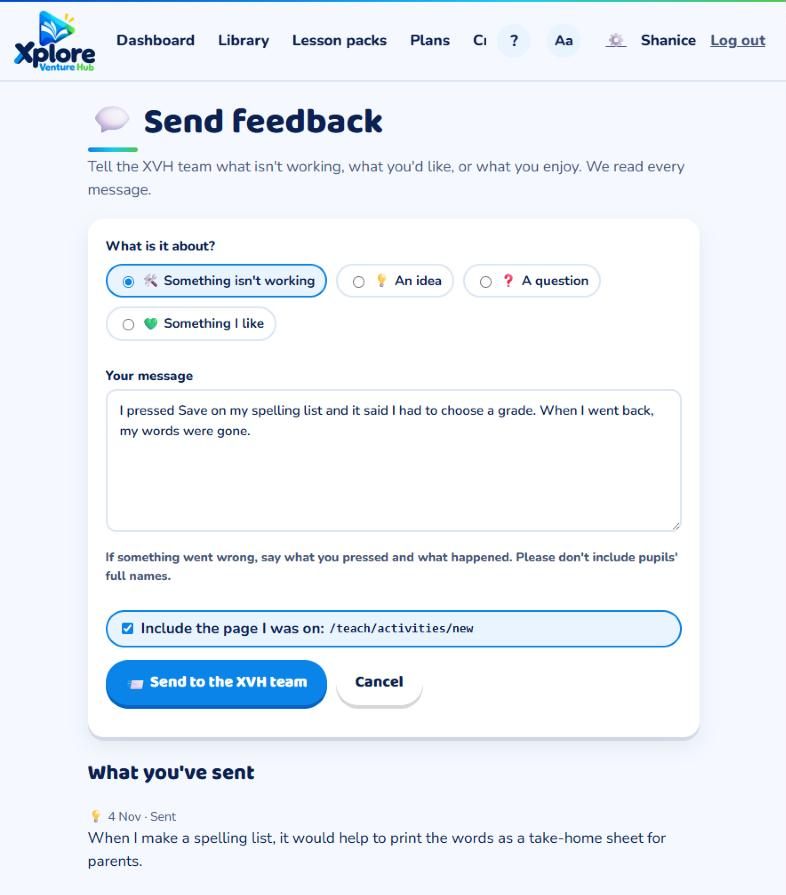
- Choose what it is about: Something isn't working, An idea, A question or Something I like.
- Write your message. If something went wrong, say what you pressed and what happened.
- Leave Include the page I was on ticked, so we can see exactly where it happened.
- Press 📨 Send to the XVH team. You go straight back to the page you were on.
Please don't put pupils' full names in feedback. Use a first name or "a pupil" instead.
Answers
The XVH team reads every message. If we answer, the answer comes by email, and you can also see it under What you've sent on the feedback page.
Teachers: if a question in an activity is wrong, use ⚑ Report a problem inside the activity instead. It shows us the exact question.