
📱 Your device
Messages from the XVH team
News and announcements from XVH come by email, phone notification and a notice on your dashboard. How to turn the emails off.
Now and then the XVH team sends news to teachers and parents, for example about new activities or a holiday.
How messages reach you
- 📣 A notice on your dashboard, for 30 days. Press ✕ to close it once you've read it.
- 📧 An email, if your account has an email address.
- 🔔 A phone notification, if you turned phone notifications on. Late at night they wait until morning.
Turning the emails off
Every email has a Stop emails like this from the XVH team link at the bottom. You can also turn them off or back on at any time on My account, under Emails. Dashboard notices still show, so you won't miss anything important.
For the XVH admin: sending a message
Open Admin → Messages.
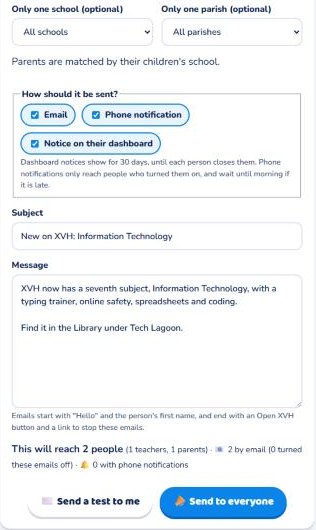
- Choose who it is for: all teachers, all parents, or both. You can choose one school or one parish (parents are matched by their children's school).
- Choose how to send it: email, phone notification and/or dashboard notice.
- Write a subject and the message (leave a blank line between paragraphs). The page shows how many people it will reach.
- Press ✉️ Send a test to me to check the email in your own inbox.
- Press 📣 Send to everyone, and confirm.
The Sent messages table shows how many emails went out, failed or were skipped (people who turned these emails off), and lets you take a dashboard notice down early.