
📌 Setting work
Build your own activities
Make quizzes, drag-and-drop questions, writing tasks, word searches and more.
Go to Create in the menu and press + Create an activity. Choose the type:
- Quiz (multiple choice)
- Drag, sort and fill (sort into groups, put in order, number line, fill the gap, sentence builder, shade a fraction, bar chart)
- Writing task (marked with a rubric)
- Drawing studio (a prompt for pupils to draw; pictures come to your Pictures page) and Craft card (materials and steps to make something)
- Word search, Set the clock, Maths race, Spelling, Memory match, Maths worksheet
Save it as a draft to try it, then publish. Your activities are shared with the teachers at your school.
Your work is kept as you go
- The grade of your class is ticked for you. You must pick at least one grade: if none is ticked, 💾 Save stays on the page and shows *Pick at least one grade before saving*.
- If something else needs fixing (for example a missing title or an empty list), the page comes back with everything you typed and the problem at the top. Fix it and press 💾 Save again.
- While you type, XVH keeps a copy of your work in this browser. If the tab closes, the battery dies or the internet drops, open the activity again and press Restore it. Press Discard if you don't need it.
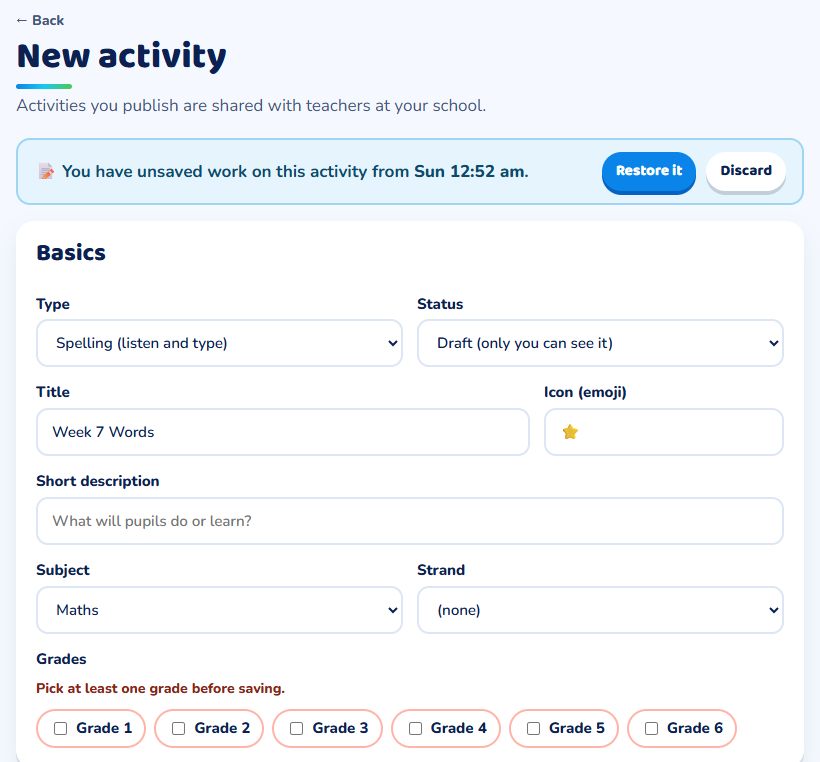
The copy is kept on the device you were using, so restore it on that same phone or computer.
See a mistake in an activity?
Press ⚑ Report a problem at the top of any activity. The XVH team checks every report and fixes or removes the question.