
📌 Setting work
Record voices for pupils
Record letter sounds, words and story pages so pupils hear a real Jamaican voice.
Computer voices can't say single letter sounds, and they don't sound Jamaican. You can fix that by recording your voice.
Open 🎙 Record voices (also on your dashboard). Choose a group:
- Letter sounds: /a/, /b/, /sh/… These play in phonics activities, for example when blending "c-a-t".
- Phonics words and Spelling words
- ABC Explorer phrases ("A is for ant")
- Story pages
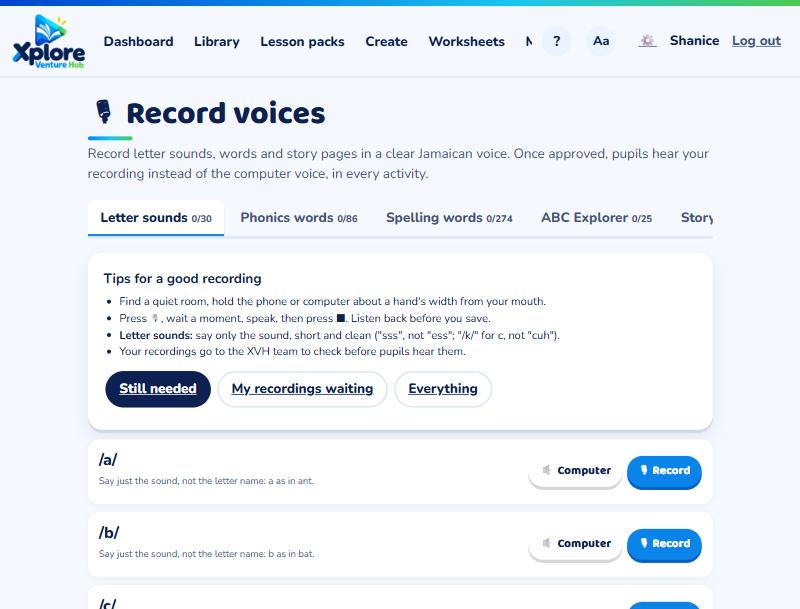
For each one, press 🔈 Computer to hear what it says now, then 🎙 Record, speak, and press ⏹ Stop. Listen back, then 💾 Save (or record again).
Tips
- A quiet room makes the biggest difference.
- For letter sounds, say only the sound: "sss", not "ess".
- Read story pages slowly and with expression.
Recordings are checked by the XVH team before pupils hear them. Once approved, they play in every activity for every school, instead of the computer voice.
Pupils (or parents) who prefer the computer voice can turn recordings off in the 🗣️ voice settings.